Pulse
Users may engage the Pulse from the following locations:
- An icon configured in the Synapse PACS viewer toolbar
- SynComm Landing Pulse tab
- A desktop shortcut
The contains three main sections:
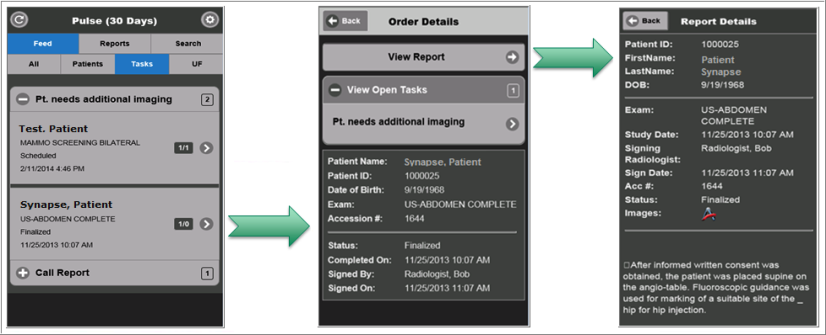
When engaging the Feed tab, 4 additional sections are available:
- All: Displays all data being actively 'followed' by the user including patients, tasks, & urgent findings (UF)
- Patients: Displays all patients being followed by the user
- Tasks: Displays all tasks being followed by the user
- UF: Displays all urgent findings being followed by the user
From the Pulse, users may review and complete open tasks and urgent findings, therefore removing the entries from the respective worklists within the SynComm Landing.
Engaging the View Report option from the Order Details (as shown below) will display the full report, if available, as well as provide an option to launch images.
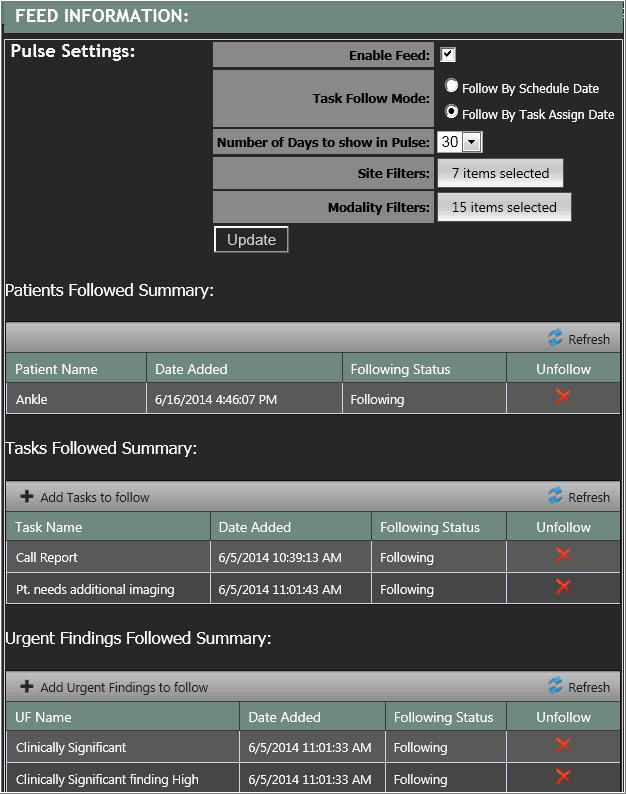
Users configure their Pulse preferences from the SynComm Landing User Options -> Pulse Settings page. Only users who have been granted privilege to use the Pulse by system administrators will have access to this page.